S3 API: What Developers Need to Know in 2026
If you build AI products, data pipelines, media systems, or modern SaaS backends, you are almost certainly building on top of object storage whether you think about it that way or not. In 2026, the real skill is not just knowing what Amazon S3 is. It is understanding the S3 API, how S3-compatible API implementations work across providers, and how to design storage flows that stay portable, fast, and cost-efficient as your workloads scale.
For developers and AI teams, that matters because storage is now directly tied to model checkpoints, datasets, embeddings, generated assets, logs, artifacts, signed file delivery, and inference outputs. The teams that move fastest are the ones that treat object storage as programmable infrastructure, not just a bucket where files go to sit.
The problem is that many articles stop at basic upload and download examples. They rarely explain the important stuff: how S3 API access behaves in production, what the S3 GET API actually returns and costs you, where compatibility breaks between vendors, how metadata and versioning shape architecture decisions, and why smaller providers such as BHK Cloud can be a better fit than hyperscalers for AI-heavy teams that want lower cost and less operational drag.
This guide closes those gaps.
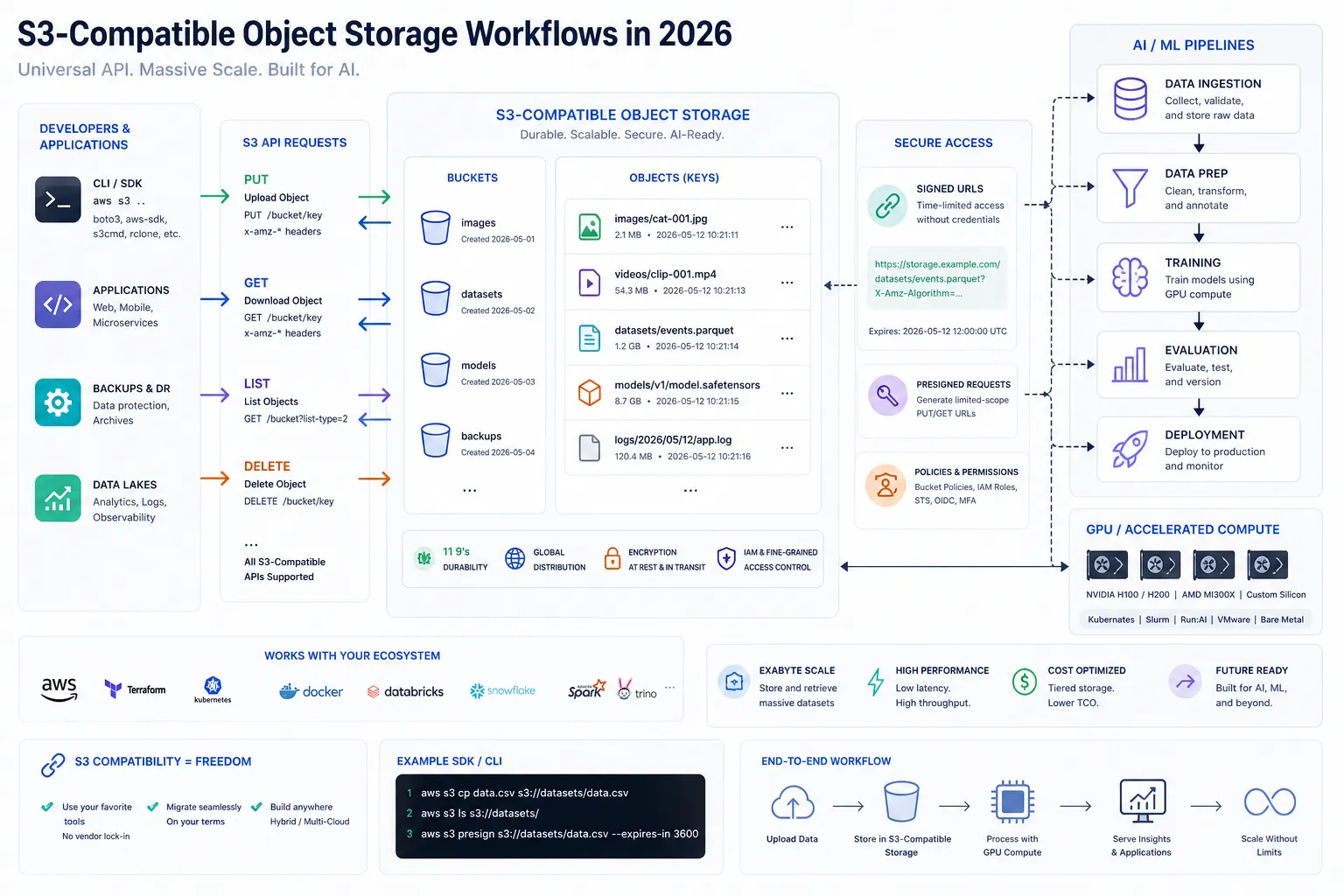
What the S3 API Actually Is
The S3 API is the HTTP-based interface used to interact with object storage. It defines how applications create buckets, upload objects, download objects, list keys, manage metadata, configure lifecycle rules, generate signed URLs, and perform related storage operations.
At a high level, the core concepts are simple:
Concept | What it means |
|---|---|
Bucket | A top-level container for objects |
Object | A file plus metadata, stored under a key |
Key | The unique path-like identifier for an object |
API request | An HTTP call such as GET, PUT, HEAD, DELETE, or LIST |
Credentials | Access keys or temporary credentials used to sign requests |
Endpoint | The storage service URL your SDK or application talks to |
The key distinction in 2026 is this:
Amazon S3 is a storage service from AWS.
The S3 API is the interface pattern many storage providers implement.
S3-compatible storage means another provider supports enough of that interface for your existing tools and SDKs to work with minimal changes.
That is why the S3 model became the default object storage language for developers. Once your tooling understands buckets, objects, keys, ACL alternatives, metadata, and signed requests, you can often reuse the same application logic across environments.
Why Developers Still Standardize on S3-Compatible Storage
S3 compatibility won because it solves a practical problem: portability. Teams want to avoid rewriting storage code every time costs spike, regions change, or a training pipeline grows beyond its original architecture.
A mature S3 compatible api lets you keep using:
AWS SDKs
MinIO-compatible tooling
Backup and sync utilities
Data pipeline frameworks
Media upload workflows
ML artifact managers
Infrastructure automation scripts
For AI and ML teams, that portability is especially valuable. Datasets, checkpoints, LoRA weights, inference outputs, and training logs all fit naturally into object storage. If your storage speaks S3, your stack remains easier to migrate and easier to automate.
That is one reason BHK Cloud’s storage strategy is compelling. Instead of forcing a proprietary interface, BHK Cloud provides S3-compatible object storage with developer-friendly primitives like versioning, lifecycle rules, signed URLs, and strong consistency. For teams already working with standard SDKs, adoption is straightforward.
The S3 Object Model Developers Need to Understand
A single S3 object is not just a file blob. It includes:
The object key
Binary or text content
System metadata
Optional custom metadata
Version identity if versioning is enabled
Storage class or lifecycle state
ETag or checksum-related information
That matters because your application design should treat storage objects as structured assets, not dumb files.
Example: AI checkpoint workflow
A model checkpoint object might include:
Key:
checkpoints/run-184/epoch-12/model.safetensorsMetadata: model family, training step, commit SHA, owner
Tags: environment, retention class, billing label
Versioning: on
Lifecycle: archive after 30 days, expire after 180 days
Once you understand the S3 object API this way, you stop seeing object storage as secondary infrastructure and start using it as a durable, queryable asset layer for modern systems.
Common S3 API Operations and What They Mean in Practice
Most applications only rely on a relatively small set of object-storage operations. The important part is understanding what each one does operationally and architecturally.
GET Object
The S3 GET API retrieves the contents of an object.
Typical use cases:
Serving images, videos, or downloadable files
Loading model artifacts at startup
Fetching inference inputs
Downloading logs or reports
Restoring user uploads for processing
Example flow:
aws s3api get-object \ --bucket app-assets \ --key models/embeddings.bin \ embeddings.bin
Production implications:
Large GET-heavy workloads can drive bandwidth and request costs
Latency depends on provider, region, object size, and caching layer
Range requests matter for large media or partial-read workflows
Signed GET URLs are usually safer than exposing bucket credentials
PUT Object
Uploads a new object or replaces an existing object.
Use cases:
User uploads
Model artifact writes
Generated image output
Training checkpoints
ETL pipeline results
Example:
aws s3api put-object \ --bucket app-assets \ --key outputs/render-001.png \ --body ./render-001.png
HEAD Object
Retrieves metadata without returning the object body.
Useful for:
Existence checks
Cache validation
Size lookup
Content type inspection
Workflow gating before expensive downloads
LIST Objects
Lists keys in a bucket or prefix.
Useful for:
Enumerating training runs
Scanning partitioned datasets
Building dashboards
Cleanup jobs
Admin tooling
DELETE Object
Removes an object, or adds a delete marker in versioned buckets.
Important for:
Retention policies
GDPR workflows
Generated asset cleanup
Temporary workspace teardown
S3 API Access: Authentication, Signing, and Safety
Most S3 API access relies on signed requests. Instead of sending credentials raw, clients generate a signature over the request using access keys, secret keys, headers, region-style settings, and request details.
In practice, developers usually interact through:
Official SDKs
CLI tools
Pre-signed URLs
CI/CD automation
Backend services using service credentials
The safest access patterns in 2026
Pattern | Best use case | Why it matters |
|---|---|---|
Server-side credentials | Backend jobs and APIs | Keeps secrets off client devices |
Pre-signed URLs | Browser or mobile upload/download | Fine-grained temporary access |
Short-lived credentials | Internal platforms | Lower blast radius |
Prefix-scoped access | Team or tenant isolation | Cleaner multi-tenant design |
A lot of teams still misuse broad root-style credentials for everything. That is an anti-pattern. If your application needs limited upload rights to a specific path, issue exactly that.
Strong Consistency Changed How We Design Storage Workflows
Historically, developers had to work around eventual consistency in some object-storage systems. That often meant retries, delayed listings, out-of-band indexing, or awkward queue-based synchronization.
Today, modern S3-style systems increasingly offer strong consistency, which simplifies application design significantly.
"Amazon S3 provides strong read-after-write consistency for all applications, ensuring that after a successful write of a new object or an overwrite of an existing object, any subsequent read request immediately receives the latest version of the object." - AWS
For developers, this means:
You can upload an object and read it back immediately
Listing results reflect recent writes more predictably
Multi-step application flows become simpler
You need fewer homegrown consistency workarounds
BHK Cloud emphasizes strong consistency in its S3-compatible storage as well, which is especially useful for AI pipelines where jobs write artifacts and downstream processes need to consume them immediately.
Durability, Scale, and Why S3 Became the Default
The S3 model became dominant because it combines simple semantics with massive durability and scale.
"Amazon S3 is designed to provide 99.999999999% (11 nines) data durability, storing data redundantly across a minimum of three Availability Zones (AZs) by default." - AWS
That durability benchmark shaped developer expectations for object storage everywhere. Even when teams do not need AWS itself, they still want:
Extremely durable object storage
API compatibility
Predictable reads and writes
Version protection
Lifecycle automation
Simple SDK support
This is exactly where alternative providers can be attractive: you keep the interface and storage model you already know, but avoid hyperscaler pricing and complexity.
AWS S3 vs S3-Compatible Storage: What Is Usually the Same
Many teams ask whether S3-compatible means “identical.” Usually, no. But the overlap is often large enough that your application can remain portable.
Here is what is commonly the same:
Capability | AWS S3 | Typical S3-compatible provider |
|---|---|---|
Buckets and objects | Yes | Yes |
PUT/GET/HEAD/DELETE | Yes | Yes |
Pre-signed URLs | Yes | Usually |
Multipart upload | Yes | Usually |
Versioning | Yes | Often |
Lifecycle rules | Yes | Often |
Standard SDK support | Yes | Usually |
CLI compatibility | Yes | Usually |
And here is where differences can appear:
Area | Potential compatibility gap |
|---|---|
IAM-style policy features | Vendor-specific or simplified |
Exact error codes | May differ |
Region naming and signing details | Can vary |
Storage classes | Different product model |
Replication and event integrations | Not always identical |
Edge-case ACL behavior | Often not recommended or not fully matched |
That is why smart teams validate compatibility based on their actual workload, not marketing claims.
What Competitor Content Usually Misses About S3 Compatibility
Most articles about object storage repeat the same basics:
S3 stores files in buckets
You can upload and download objects
SDKs make it easy
S3 scales well
That is all true, but incomplete.
The real content gaps are:
1. They ignore portability economics
The API is only half the story. The real benefit is reducing migration cost and preserving tooling. If your code, CI, GPU jobs, and storage SDK usage stay constant, moving infrastructure becomes much easier.
2. They do not connect storage to AI workflows
Modern storage is not just static asset storage. It is used for:
Dataset staging
Checkpoint persistence
Fine-tuning inputs
Batch inference outputs
Render artifacts
Retrieval corpora
Image generation pipelines
3. They avoid cost architecture
A cheap compute node paired with expensive data transfer is not actually cheap. For AI workloads, zero-fee data movement between compute and storage can materially change system economics.
BHK Cloud stands out here because it combines affordable RTX 3090 GPU compute with S3-compatible storage and zero egress fees between GPU and storage. That matters for teams moving large checkpoints, generated media, embeddings, and training data all day long.
4. They skip day-2 operations
Real systems need:
Versioning
Snapshots
Lifecycle rules
Signed URLs
Persistent volumes
Recovery workflows
Predictable billing
That is where many smaller, developer-first providers beat hyperscalers: less product sprawl, less enterprise bloat, faster setup, and clearer pricing.
S3 Access Patterns That Matter Most in 2026
When developers talk about S3 access, they are really talking about application behavior over time. The right storage design depends on read/write shape, object size, concurrency, retention, and downstream compute locality.
1. Read-heavy asset delivery
Best for:
Media delivery
Public downloads
Model distribution
Static application assets
Design tips:
Use signed URLs when access should be temporary
Cache frequently accessed objects
Separate hot assets from archival data
2. Write-heavy pipeline storage
Best for:
Batch jobs
Data ingestion
Log collection
Generated image or video output
Design tips:
Use structured prefixes
Track metadata consistently
Enable lifecycle cleanup for temporary artifacts
3. Checkpoint and artifact storage
Best for:
Training runs
Fine-tuning jobs
Evaluation outputs
Experiment comparison
Design tips:
Turn on versioning
Use immutable naming where possible
Tag objects by run, model, and environment
4. Multi-tenant application storage
Best for:
SaaS uploads
Team workspaces
User-generated content
Design tips:
Isolate by prefix or bucket
Use scoped pre-signed URLs
Avoid long-lived client credentials
S3 GET API Performance and Cost: The Part Teams Learn Too Late
The S3 get api seems simple because it is simple. But GET-heavy architectures can become expensive and slower than expected if they are not designed carefully.
Watch for these cost and performance drivers:
Factor | Why it matters |
|---|---|
Request volume | Millions of small GETs add up |
Object size | Larger responses increase transfer time |
Cross-region reads | Adds latency and transfer complexity |
Repeated startup downloads | Slows batch workers and model servers |
Public hot objects without caching | Wastes bandwidth and money |
Practical optimization tips
Keep hot data close to compute
Cache common artifacts locally where appropriate
Use partial reads for large files when possible
Avoid repeatedly pulling the same model weights for every short-lived job
Pair GPU compute with storage that does not penalize internal traffic
This is where BHK Cloud has a strong architectural advantage for AI teams. If your workloads run on RTX 3090 instances and read from BHK Cloud’s S3-compatible storage, you avoid the kind of inter-service egress surprises that often punish high-throughput training and inference stacks elsewhere.
What a Modern S3 Object API Workflow Looks Like
Let’s walk through a realistic AI product flow using the s3 object api.
Example: image generation platform
User submits a generation prompt
Backend writes request payload to object storage
GPU worker reads payload and supporting assets
Model generates image output
Worker writes result image and metadata back to storage
API issues a signed URL for user retrieval
Lifecycle rules expire temporary intermediates later
This pattern works because object storage is:
Durable
Cheap compared to block storage for artifacts
Easy to integrate across services
Simple to expose safely via signed URLs
Compatible with automation and event-driven designs
For startup teams, BHK Cloud’s simpler infrastructure is attractive here. You can deploy GPU instances in under 60 seconds, interact through API or CLI, store artifacts in S3-compatible buckets, and avoid the enterprise procurement friction that slows down experimentation on larger platforms.
Screenshot: Amazon S3 as the Reference Mental Model
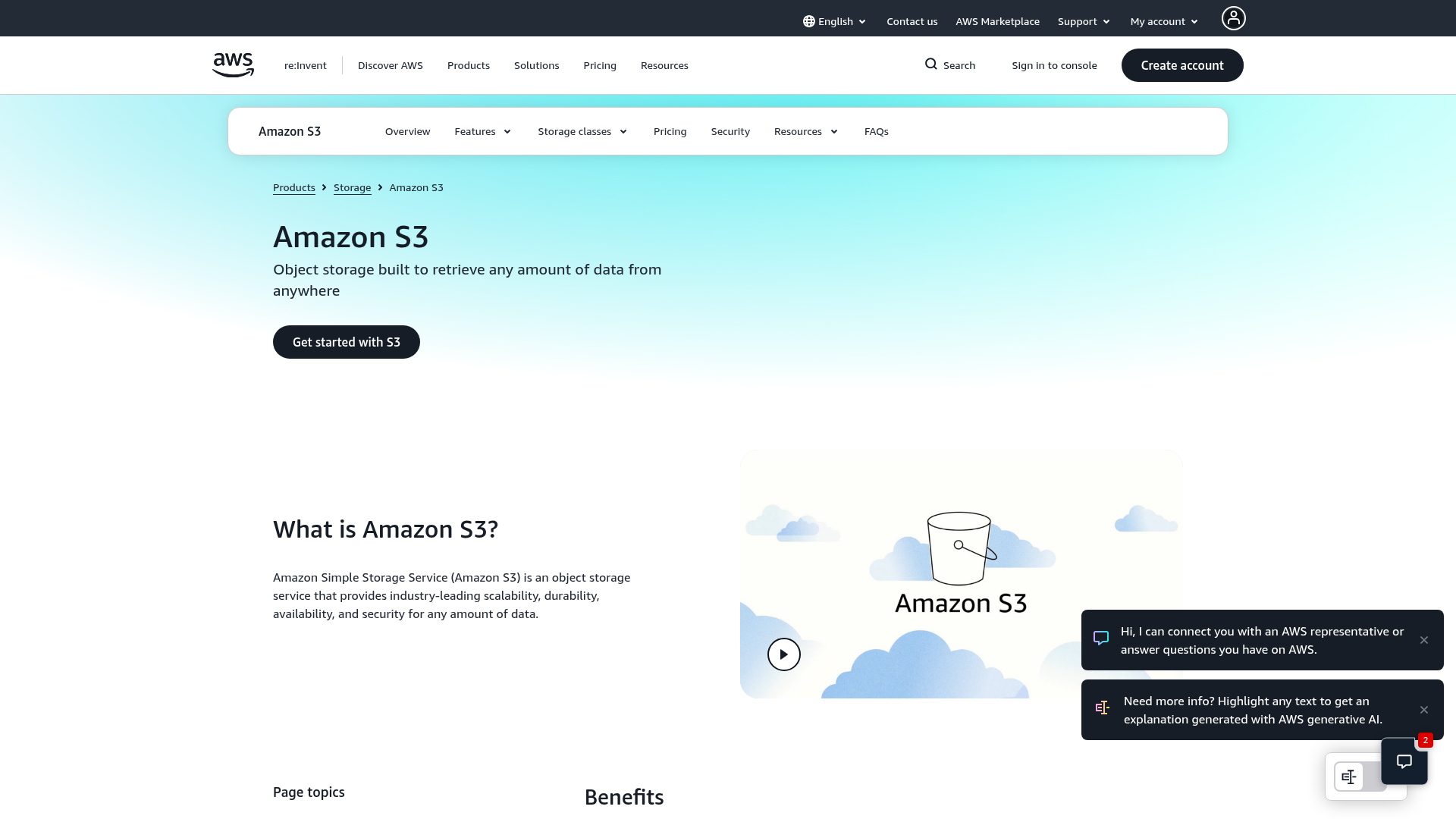
Even when you use a non-AWS provider, Amazon S3 remains the reference model most developers think in. That is why compatibility matters. Your teams, tools, SDKs, and docs already speak the language.
Where BHK Cloud Fits for Developers and AI Teams
BHK Cloud is not trying to out-bloat hyperscalers. That is the point.
For developers building AI infrastructure, the value proposition is cleaner:
Need | Why BHK Cloud is relevant |
|---|---|
Low-cost GPU compute | Much lower pricing than major hyperscalers |
Fast provisioning | GPU deployment typically in under 60 seconds |
Familiar storage interface | S3-compatible storage works with existing SDKs and tools |
Predictable billing | Transparent hourly usage with no lock-in |
High-throughput AI workflows | Zero egress fees between GPU and storage |
Practical data management | Versioning, lifecycle rules, signed URLs, and persistent infrastructure primitives |
Developer experience | API-first, CLI-friendly, minimal enterprise friction |
For teams doing inference, fine-tuning, image generation, rendering, or model experimentation, this combination is unusually practical. You want compute and storage that are easy to script, cheap to test, and not full of hidden policy, pricing, or networking traps.
Screenshot: Builder-Focused Ecosystems Matter, But Simplicity Wins
Large ecosystems have educational gravity, but for many modern teams, the winning stack is not the one with the most services. It is the one with the shortest path from idea to working pipeline.
Best Practices for S3 API Usage in 2026
Design for prefixes and naming early
Do not let object keys become accidental chaos. A clear key structure helps with listing, lifecycle policies, debugging, billing, and multi-tenant isolation.
Example:
env/project/workload/date/run-id/artifact-name
Use metadata deliberately
Add metadata for:
Build SHA
Dataset version
Tenant ID
Pipeline stage
Content type
Retention label
It will save time later.
Turn on versioning for important artifacts
For checkpoints, application assets, generated outputs under review, and user-facing critical objects, versioning is cheap insurance.
Prefer signed URLs over broad client credentials
This reduces exposure while keeping UX simple.
Keep compute close to storage
This matters for AI more than most teams realize. Moving multi-GB model files or large generated outputs repeatedly across expensive boundaries kills efficiency.
Test compatibility before migration
Validate:
Multipart upload behavior
SDK endpoint config
Signed URL format
Metadata handling
Error responses
Lifecycle and versioning semantics
A Practical Migration Checklist for S3-Compatible Storage
If you are moving from AWS S3 or another provider to a compatible platform, use this checklist:
Check | Why it matters |
|---|---|
SDK endpoint override works | Needed for application portability |
Auth and signing succeed | Prevents runtime failures |
Bucket naming conventions fit | Some systems vary in constraints |
Pre-signed uploads/downloads behave correctly | Important for frontend flows |
Metadata survives round-trip | Critical for asset workflows |
Multipart upload support is stable | Needed for large object transfers |
Lifecycle rules map cleanly | Important for storage cost control |
Versioning works as expected | Required for rollback and recovery |
Final Verdict
In 2026, understanding the S3 API is no longer optional for serious developers. It is foundational infrastructure knowledge for AI applications, media systems, SaaS products, and data-heavy services. The API model itself is straightforward. What separates advanced teams is knowing how to use it for portability, performance, consistency, security, and cost control.
That is also why the market is shifting beyond hyperscaler default choices. If you want familiar S3 API access, modern object workflows, lower operational complexity, and infrastructure economics that make sense for training, inference, rendering, and experimentation, BHK Cloud is a strong option.
You get the pieces that matter:
S3-compatible storage that works with existing tooling
Fast, affordable RTX 3090 GPU infrastructure
Zero egress fees between compute and storage
Transparent hourly billing
Versioning, lifecycle rules, signed URLs, and persistent storage features
An API-first, CLI-friendly developer experience without lock-in
For builders who want modern cloud primitives without hyperscaler overhead, that is exactly the right tradeoff. If your team is tired of complexity and surprise pricing, this is the moment to test BHK Cloud and see how much faster a cleaner stack can feel.
FAQ
What is the best AI API for 2026?
There is no single best option for every use case, but the best stack in practice combines a strong model API with cost-efficient compute and S3-compatible storage. For teams building production AI systems, the winning choice is usually the one that reduces infrastructure friction, keeps data close to GPUs, and avoids lock-in.
How does Amazon S3 achieve 99.999999999% durability?
Amazon S3 achieves its durability target by storing data redundantly across multiple Availability Zones and validating object integrity continuously. The durability model is built around distributed replication, fault isolation, and highly resilient storage architecture.
How many AWS services are there in 2026?
AWS offers hundreds of services across compute, storage, networking, data, AI, security, and operations. The exact number changes constantly as AWS adds, renames, and expands offerings.
What is the difference between S3 and S3 API?
Amazon S3 is AWS’s object storage service, while the S3 API is the interface used to interact with object storage programmatically. Many non-AWS platforms implement an S3-compatible API so existing tools and SDKs continue to work.
Which 3 jobs will survive AI?
Roles that combine technical judgment and business context are the most durable, including AI engineers, platform developers, and infrastructure architects. AI automates tasks, but teams still need people who can design systems, control cost, and ship reliable products.
What are the 4 types of API?
The four common categories are open APIs, partner APIs, internal APIs, and composite APIs. In practice, developers also classify APIs by style, such as REST, GraphQL, gRPC, and event-driven interfaces.